

0040 00
TM 1-4920-440-13&P
NOTE
During installation of components the same hardware should be used so as to maintain the
original integrity of the shop sets.
INSPECTION OF INSTALLED ITEMS
CLERK DESK
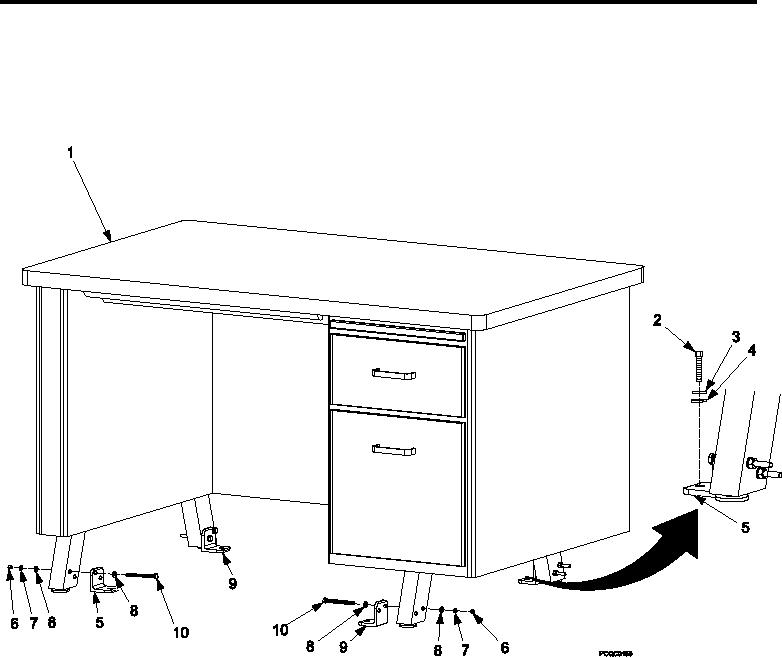
Figure 1.
Clerk Desk.
1.
Inspect clerk desk (Figure 1) for damage. Replace as necessary.
2.
Inspect all clerk desk hardware (Figure 1, Item 2, 3, 4, 6, 7, 8, and 10) for rust, cracks and rounded heads.
Replace as necessary.
REMOVAL
CLERK DESK
1.
Remove clerk desk (Figure 1, Item 1) by removing four bolts (Figure 1, Item 2), four lock washers (Figure 1,
Item 3), and four lat washers (Figure 1, Item 4) from right rear and left front leg brackets (Figure 1, Item 5)
and right front and left rear leg brackets (Figure 1, Item 9).
2.
Remove four bolts (Figure 1, Item 10), four lock washers (Figure 1, Item 7), eight lat washers (Figure 1, Item
8) and four nuts (Figure 1, Item 6), detaching right rear and left front leg brackets (Figure 1, Item 5).
3.
Remove four bolts (Figure 1, Item 10), four lock washers (Figure 1, Item 8), eight lat washers (Figure 1, Item
7) and four nuts (Figure 1, Item 6), detaching right rear and left front leg brackets (Figure 1, Item 9).
0040 00-2