

TM 1-4920-440-13&P
OPERATOR INSTRUCTIONS
PRODUCTION/QUALITY CONTROL SHOP
REMOVING LIGHTING
INITIAL SETUP:
References
Tools and Special Tools
General Mechanics Tool Kit
(WP 0063 00, Table 2, Item 104 )
Equipment Condition
Personnel Required
Functional
CMF 15 Series (2)
REMOVING AREA LIGHT
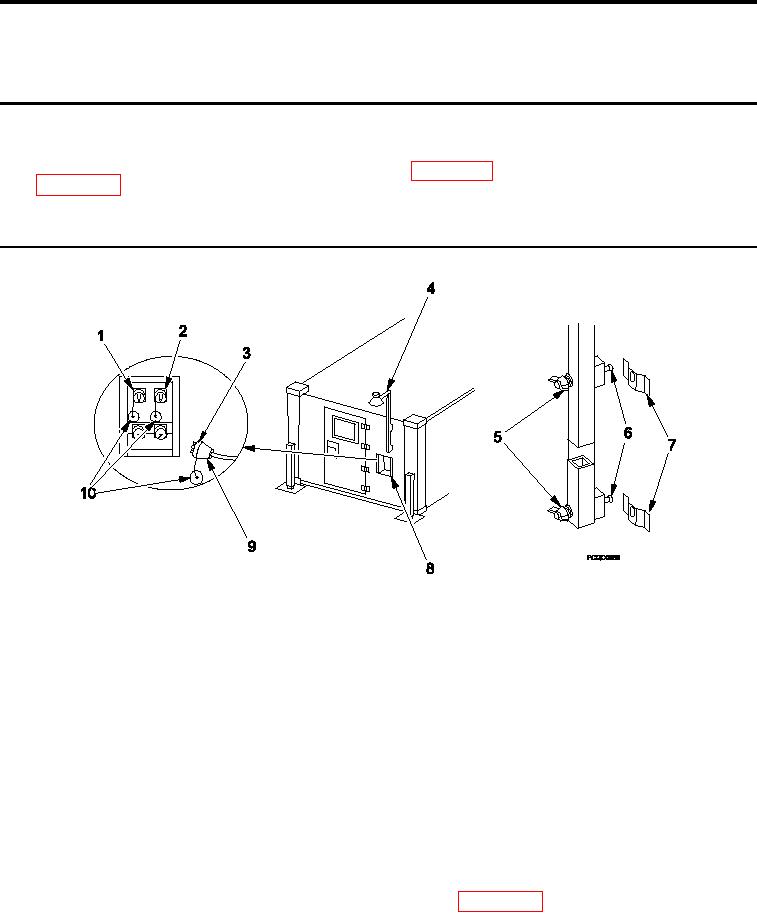
Figure 1.
Removing Area Light.
1.
Disconnect area light cable (Figure 1, Item 9) from either "J3" or "J4" connector (Figure 1, Item 1 or 2) on
power entry panel (Figure 1, Item 8) by loosening lock ring (Figure 1, Item 3).
2.
Replace protective dust cap (Figure 1, Item 10) on "J3" or "J4" connector (Figure 1, Item 1 or 2) on power
entry panel (Figure 1, Item 8).
3.
Replace protective dust cap (Figure 1, Item 10) on area light cable (Figure 1, Item 9).
NOTE
Do not remove wing nuts from screws.
4.
Loosen, DO NOT REMOVE, wing nuts (Figure 1, Item 5) and remove area light (Figure 1, Item 4) from
location outside shelter.
5.
Roll up area light cable (Figure 1, Item 9).
6.
Remove bulb and store in shelter Basic Issue Items (BII) box (WP 0002 00, Figure 2, Item 5 or Figure 3, Item
6).
7.
Install area light (Figure 1, Item 4) on inside ixed personnel end wall by securing mounting screws (Figure 1,
Item 6) to mounting brackets (Figure 1, Item 7) and tightening wing nuts.
0033 00-1